
Meebhoomi AP (మీ భూమి) – Andhra Pradesh Land Records Portal @ meebhoomi.ap.gov.in
Welcome to Meebhoomi AP (మీ భూమి), meebhoomi.ap.gov.in . It is the official digital land records portal of the Andhra Pradesh Revenue Department that provides citizens with land-related information in a fast and transparent way. On this platform, you can easily view and download Adangal, 1B (Record of Rights), Village Map, FMB (Field Measurement Book), Mutation Details, and e-Passbook.
This Digital India initiative, launched by the Andhra Pradesh Revenue Department at meebhoomi.ap.gov.in, reduces the need to visit offices, saves time, and reduces fraud. This platform makes property management more efficient, transparent, and accessible to everyone. Start viewing your land records today.
MeeBhoomi AP Portal Details
| Portal Name | MeeBhoomi AP |
|---|---|
| State | Andhra Pradesh |
| Services | 1B, Adangal, Village Map, FMB, ROFR, Mutation, E-Passbook |
| Launched By | Government of Andhra Pradesh |
| Managed By | Revenue Department |
| Official Site | https://meebhoomi.ap.gov.in/ |
Available Services on the AP Meebhoomi Portal
ROFR Adangal/Village 1B
View details like land ownership, survey number, and cultivation information.
Check NowAadhaar Linking
Check if your Aadhaar number is successfully linked with your land records.
Check NowApplication Status
Verify the current status of your submitted applications on the portal.
Check NowVillage Land Dispute
Get information about any disputes or issues related to village land records.
Check NowMeebhoomi Provides the Below Records
The portal hosts a wide range of records:
- Adangal and Village Adangal
- 1-B and Village 1-B
- LP Maps, FMB, and Village Maps
- ROFR Adangal and Village 1B
- Mutation details
- Aadhaar linking status
- Electronic Passbooks
- Village Land Dispute Tables
- Survey No. Dispute Register Report
Land Records Available on Meebhoomi
These records are categorized into:
-
Land Details:
Adangal, 1B, FMB, LP Map, Village Map, ROFR Adangal. -
Application Details:
Mutation updates, land use changes, Certificates of Ownership, Proceedings. -
Other Features:
Aadhaar seeding, E-Passbook downloads, and dispute reports.
How to Check Land Records on MeeBhoomi?
Check Your Adangal / Village Adangal on Meebhoomi Portal
On the Meebhoomi portal of the Andhra Pradesh government, you get the option to check your Adangal or Village Adangal online. By following just a few simple steps, you can see the complete details of your land, such as the owner’s name, survey number, and land extent.
Step 1:
First of all, open the Meebhoomi portal in your browser: http://meebhoomi.ap.gov.in.
Step 2:
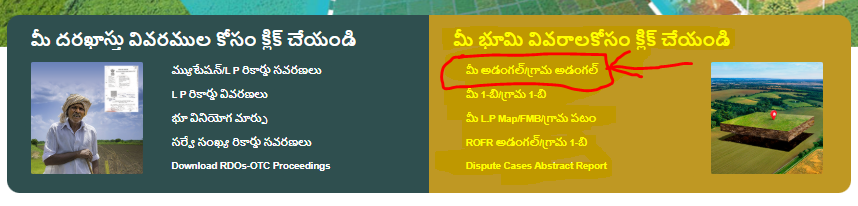
After that click on the option given on the homepage Your Adangal / Village Adangal (మీ అడంగల్/గ్రామ అడంగల్).
Step 3:
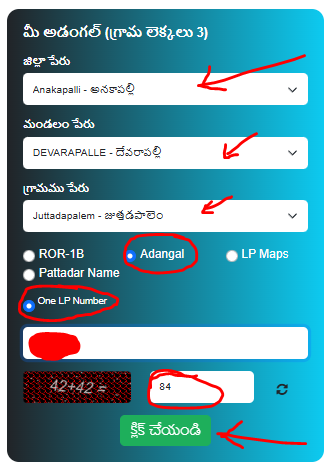
Select your District, Mandal name, and Village. Enter the Captcha code and press on the Click option.
Step 4:
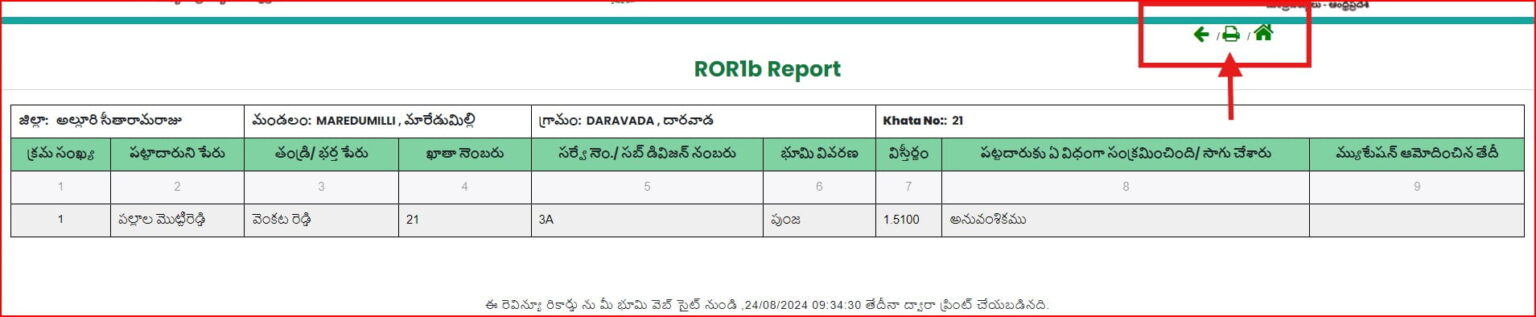
As soon as you submit, your Adangal report will display immediately in front of you. You will get much information, like the name of the owner, the area (extent) of the land, account no, water stream, and other related information.
Step 5:
If you want, you can also print or download these records in PDF format.
Check Your 1-B / Village 1-B on Meebhoomi Portal
Step 1:
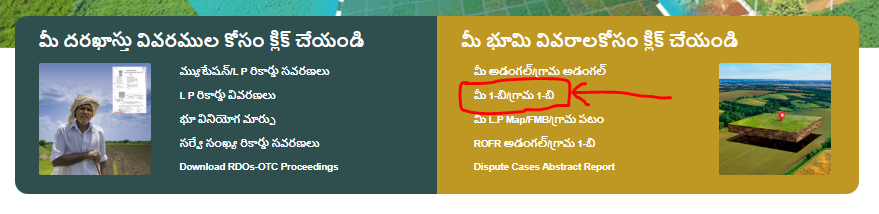
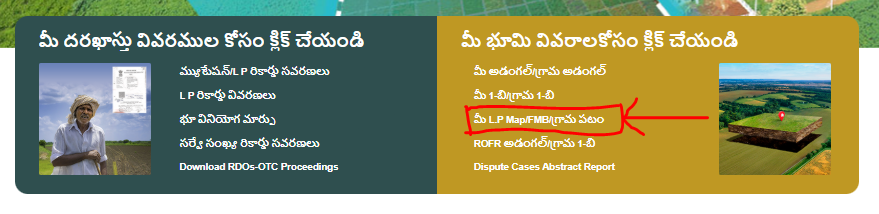
On the homepage of Meebhoomi portal, you will get “మీ 1-బి/గ్రామ 1-బి” (1-B / Village 1-B) option. Click on it.
Step 2:
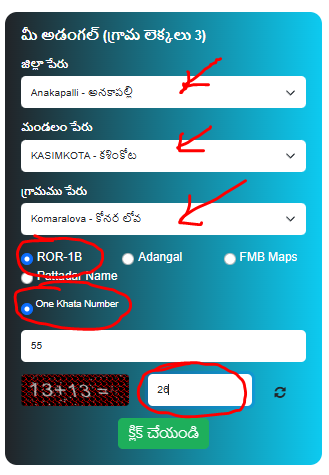
Now you have to select your District, Mandal, and Village, and select the ROR-1B land and one Khata Number options.
Step 3:
Fill in the Captcha and press the Submit button.
Step 4:
Now your 1-B record / Village 1-B record will be displayed in front of you. Here you will get land ownership information, survey info, and other important information. If you want, you can also print it or download it in PDF.
Check LP Map / FMB / Village Map on Meebhoomi Portal
Step 1: On the homepage of Meebhoomi portal, you will get the option “Your LP Map/FMB/Village Map (మీ L.P Map/FMB/గ్రామ పటం). Click on it.
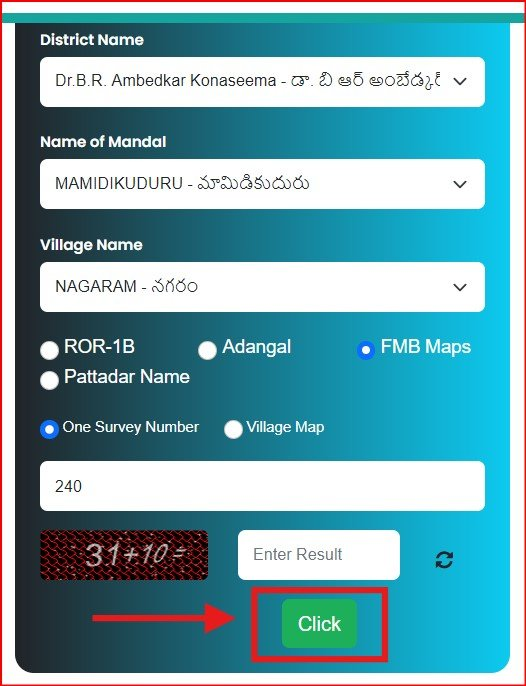
Step 2: Now select your District, Mandal, and Village. Then enter the Survey Number or Khata Number. Fill in the Captcha code and click on the Submit button.
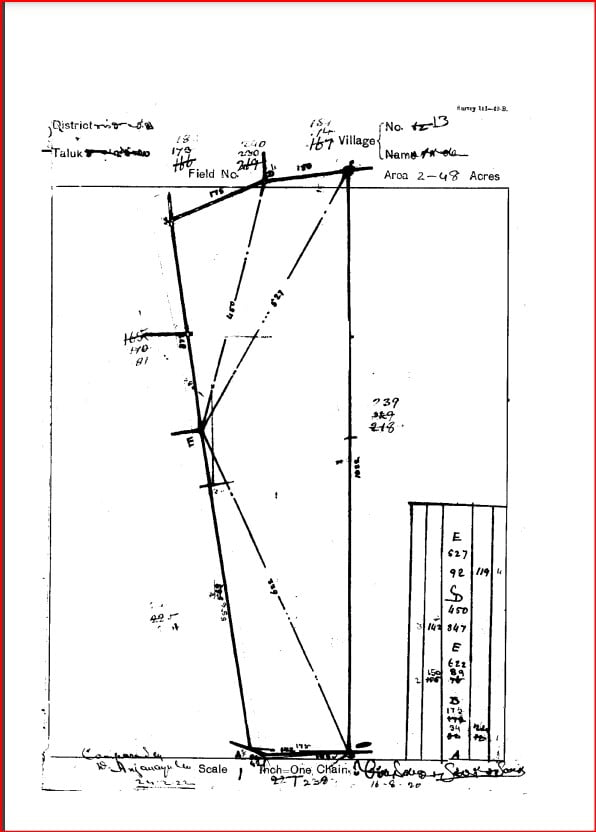
Step 3: Now your LP Map / FMB / Village Map will open in front of you. Here you will get the exact boundaries, measurements, and location of your land. If you want, you can print this map or download it in PDF format.
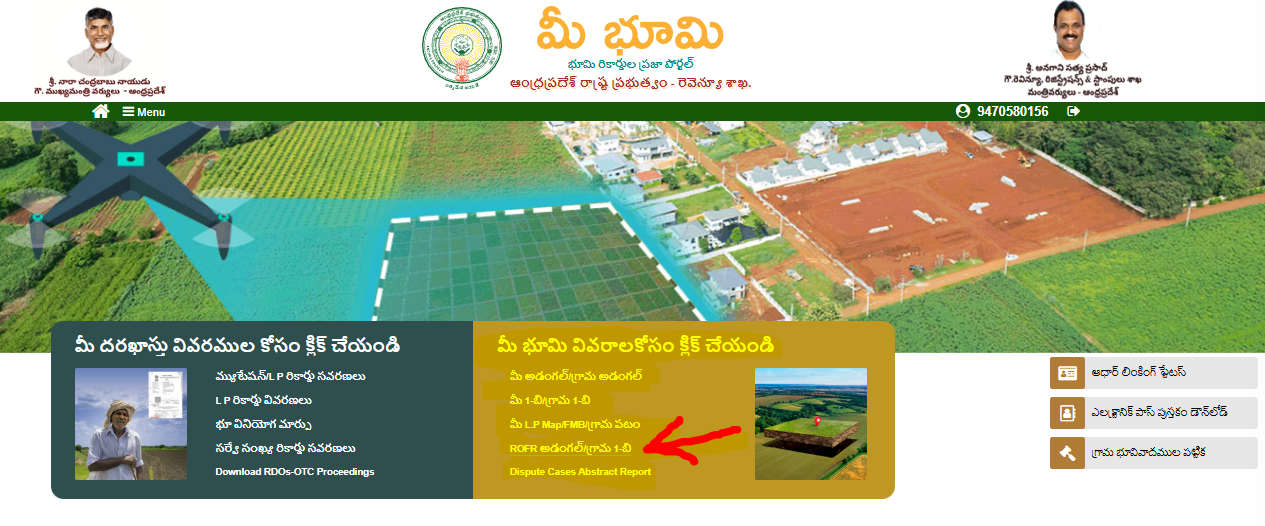
Check ROFR Adangal / Village 1-B on Meebhoomi Portal
Step 1:
Visit the official Meebhoomi portal meebhoomi.ap.gov.in and click on the ROFR Adangal/Village 1-B option.
Step 2:
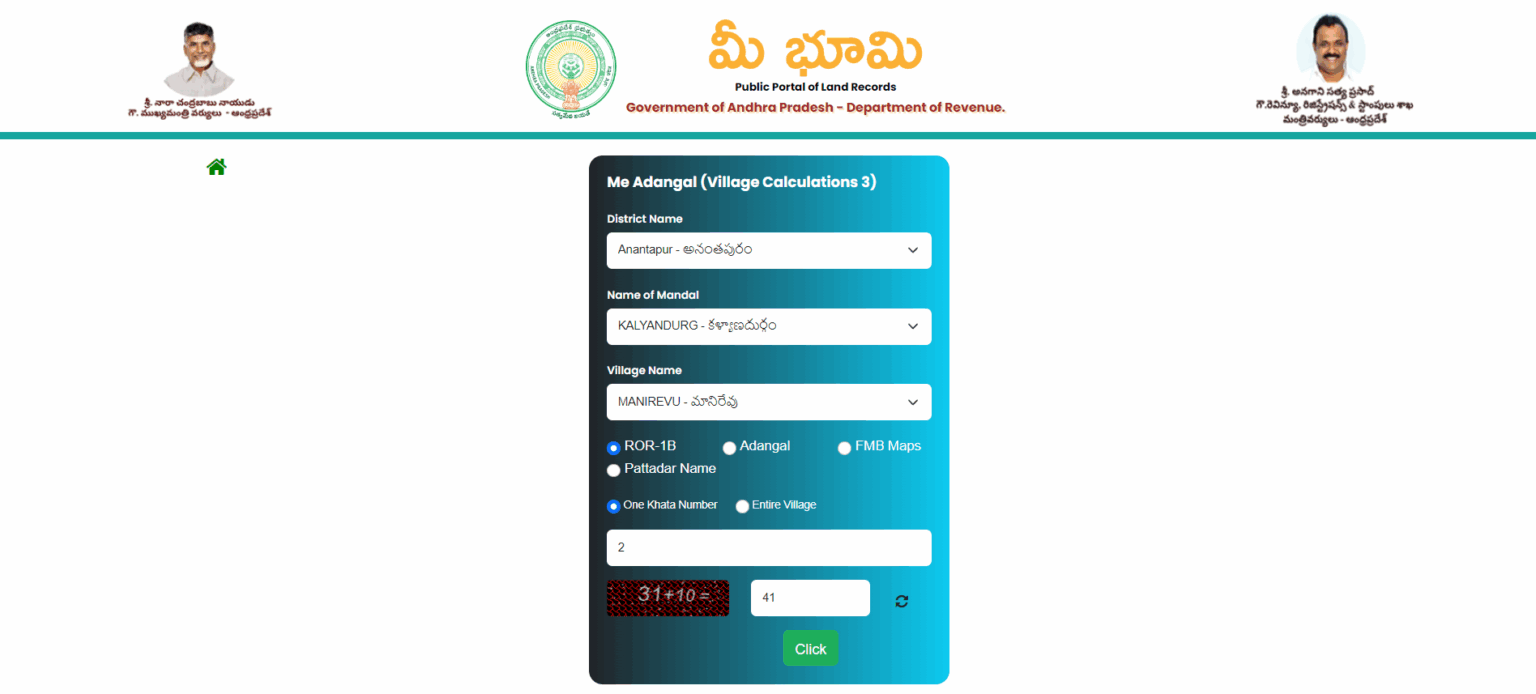
After that, a new page will open. Choose your District, Mandal, Village, and provide identifiers like Survey Number, one Khata/Account Number.
Step 3:
Solve the Captcha, then click to view the option.
Step 4:
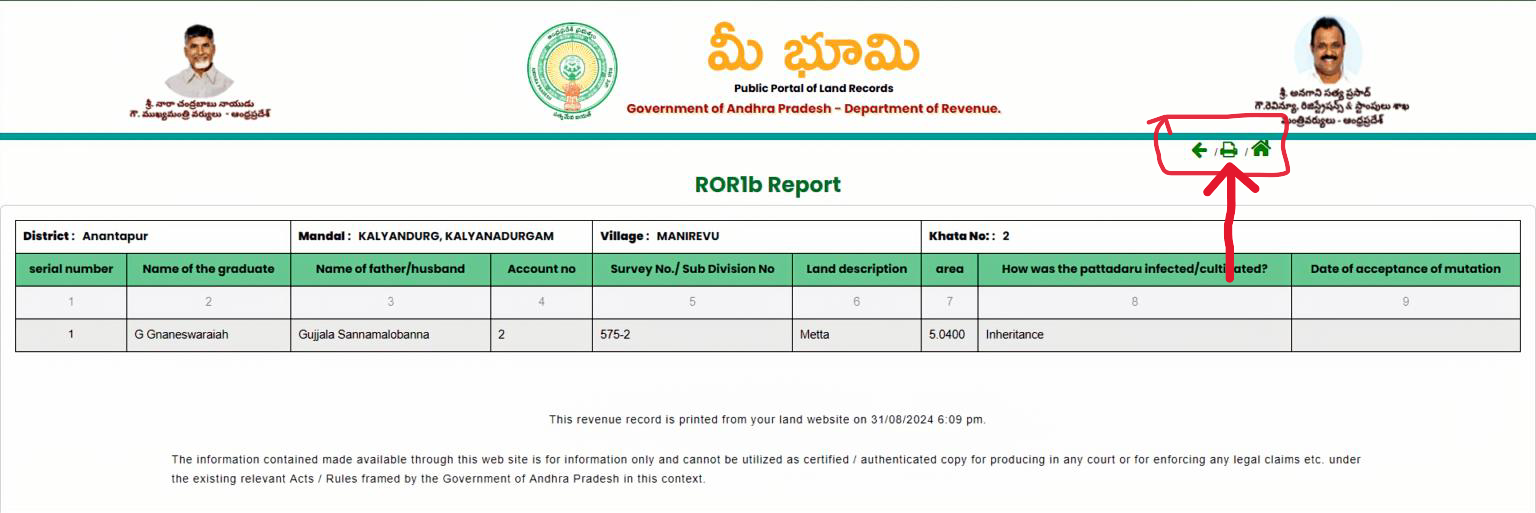
As soon as you press the submit button, the system will immediately display the complete details of the land record in front of you. Here you will get important information, such as:
- Land owner’s name
- Land’s extent/area (how much land)
- Survey number, account number, and other related details
You can then view, print, or save as a PDF.
Check Dispute Cases Abstract Report
To check the dispute cases abstract report, follow the steps below:
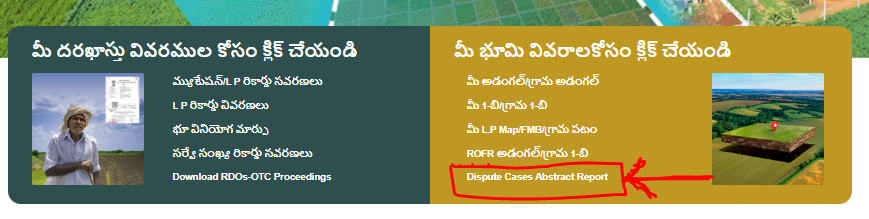
Step 1:
On the homepage of the Meebhoomi portal, you will get the option “Dispute Cases Abstract Report”. Click on it.
Step 2:
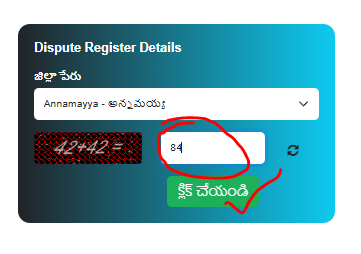
Fill in the Dispute Register Details and click on the submit button.
Step 3:
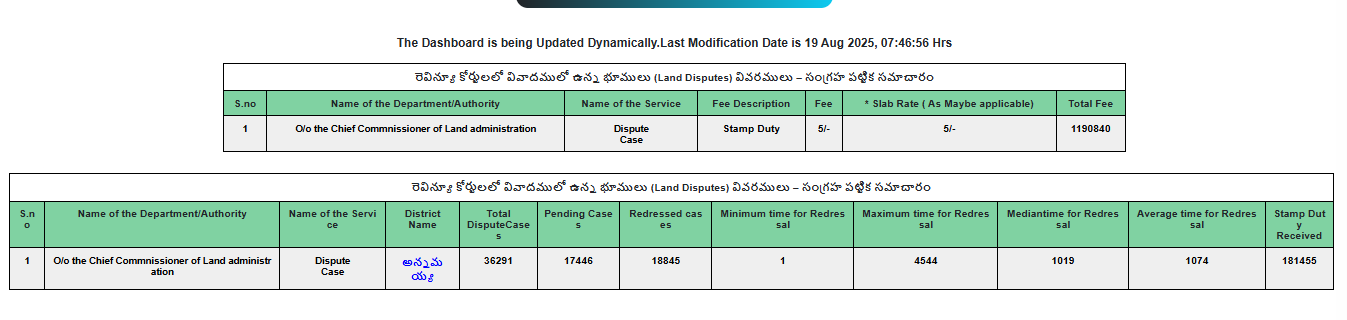
Now, your details of land disputes in the revenue courts will open in front of you.
How to Download Your E-Passbook from Mee Bhoomi Portal
The Mee Bhoomi portal of Andhra Pradesh allows landowners to easily download their Electronic Passbook (E-Passbook) online. Follow the steps below carefully:
Step 1 – Enter Your Land Details
Visit the official Mee Bhoomi website and go to the “Electronic Passbook Download (యాజమాన్యపు హక్కు పత్రము మరియు పట్టాదారు పాసు పుస్తకము)” section.
From the dropdown menus, select your District, Mandal, and Village where the land is located.
Enter your Account Number (Khata Number) correctly. If your mobile number is linked to your land records, you can continue to the next step.
Fill the Captcha Code and click on the Submit option.
Step 2 – OTP Verification
You will receive an OTP on your registered mobile number. Enter the OTP in the given field and press the OK button.
Step 3 – Download Your E-Passbook
After OTP verification, your Electronic Passbook will be displayed on the screen. You can view or download it easily.
This passbook contains important details about your land ownership, pattadar information, and other official records.
How to Check Aadhaar Linking Status on Mee Bhoomi Portal
The Government of Andhra Pradesh provides an option on the Mee Bhoomi Portal to check whether your land account is linked with Aadhaar or not. This helps landowners verify their details instantly without visiting any office.
Step 1 – Enter Your Land Details
Go to the official Mee Bhoomi website and click on “Aadhaar Linking Status (మీ భూ ఖాతా నంబరు తో మీ ఆధార్ నంబరు జత పరచబడినదో లేదో తెలుసుకోండి)”.
Select your District, Mandal, and Village from the dropdown list.
Now, you can check the Aadhaar Linking Status in two ways:
- By entering your Account Number (Khata Number)
- By entering your Aadhaar Number
Solve the Captcha Code that appears on your screen and click on the Submit / Click button.
Step 2 – View Aadhaar Linking Status
Once submitted, the portal will show whether your land account is linked with Aadhaar or not. The details displayed will include:
- Your Account Number (Khata Number)
- The Name of the Pattadar / Landholder
- The Aadhaar Linking Status (Linked / Not Linked)
You also get an option to print this information for your record.
Check Village Land Disputes
Step 1 – Enter Land Details
Go to the Mee Bhoomi Homepage → Table of Village Land Disputes (గ్రామ భూవివాదముల పట్టిక).
Now, you will have to choose your District, Mandal, and Village.
Enter your Survey Number.
After that, fill in the Captcha Code.
Click on the Submit/Click button.
Step 2 – View Land Dispute
After submitting, the Village Land Dispute Status will be shown on your screen. The report will include details such as:
- Dispute ID
- Court Name
- Type of Case / Remarks
- Survey Number
- Case/File Number
- Present Status
- Petitioner Name
- Respondent Name
- File/Document
You can also click on the Print Icon to download or take a copy of this report.
Benefits of AP Meebhoomi Portal
- Citizens can check land details online without visiting the Mandal office.
- Provides transparent land records to avoid disputes.
- Free access to Adangal, 1-B, Maps, Passbooks, and other services.
- Access records anytime via the portal or app.
Contact Support
For assistance, visit the “Contact” section on meebhoomi.ap.gov.in or reach out to your local revenue office.
Mee-bhoomi AP portal is a very useful digital platform for the citizens of Andhra Pradesh, where you can check your land records online from home. Whether you want to see Adangal, 1-B record, FMB/Village Map, ROFR Adangal, or Dispute Report, all options are easily available in one place.
This platform makes paperwork easy, but for any official/legal use, it is important to take a certified copy from the revenue office. Overall, through the portal, you can view every detail, map, and ownership record of your land anytime, from anywhere.