
BhuNaksha AP (Cadastral Map FMB) – Guide for Andhra Pradesh Land Maps @ bhunaksha.ap.gov.in
If you want to see the mapping of your land, plot location, or khasra number in Andhra Pradesh, then the Bhu Naksha Andhra Pradesh Portal is the easiest and most reliable option for you.
Other Meebhoomi Services
How to Download FMB Data from BhuNaksha AP?
The Field Measurement Book (FMB) is an official land record document that contains the exact size, shape, and boundary details of the plot. In simple terms, it works as a mini-map of every survey number, showing precise land measurements and boundaries.
Step-by-Step Process
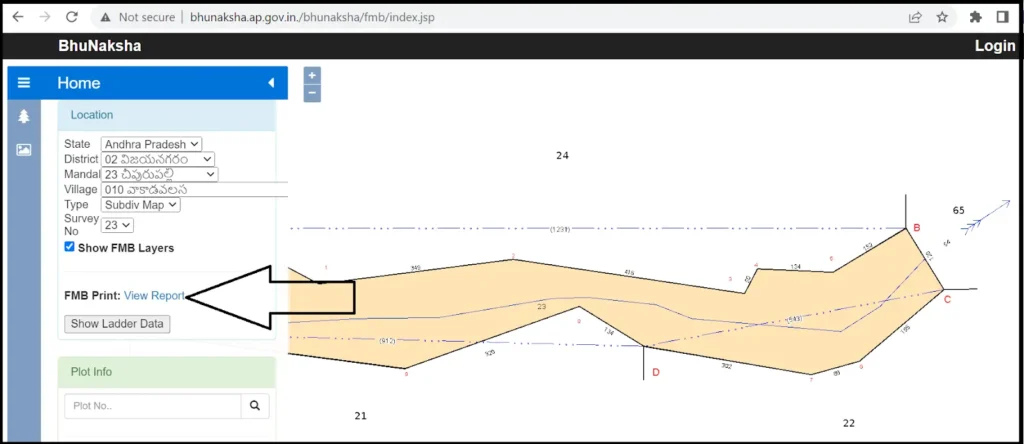
Step 1- Open the official BhuNaksha AP web application.
Step 2- Press the “Online Subdivision” button on the homepage.
Step 3- Fill in the necessary details such as State, District, Mandal, Village, Survey Type, and Survey Number.
Step 4- Click on the Tick option on the Field Measurement Book (FMB) Layer.
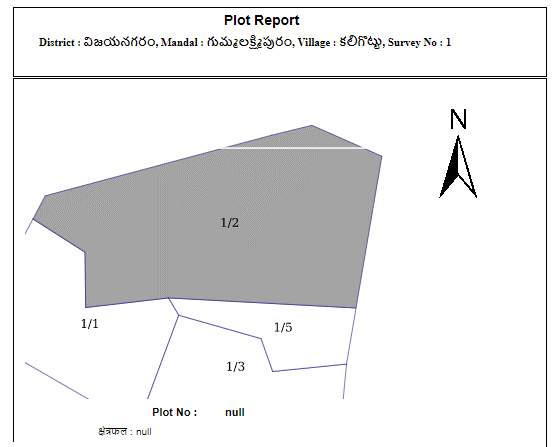
Step 5- Finally, click on “View Report” or FMB Print to download your data.
Step 6- Once done, simply click on the “View Report” or “Print” option, and your Field Measurement Book (FMB) details will be available instantly in digital format.
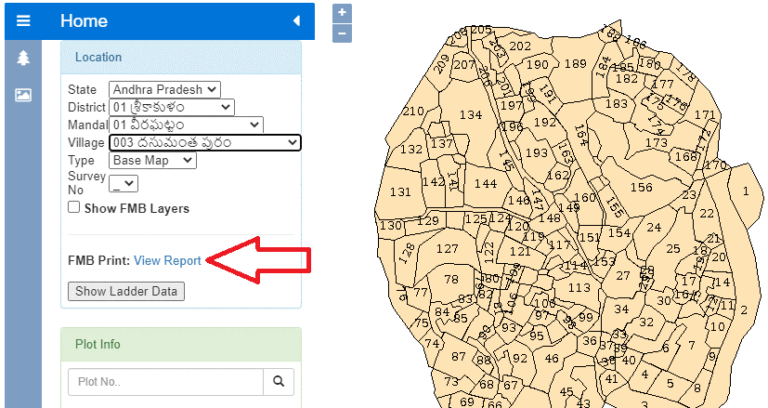
How to Check Cadastral Maps on BhuNaksha AP Portal
If you want to see the cadastral map (naksha) of your land, then you can easily check it online from the BhuNaksha AP portal. Just follow these steps:
Step 1: First of all, go to bhunaksha.ap.gov.in.
Step 2: Here, you will have to fill in the land details of your plot, such as:
- District – Select your district.
- Mandal / Zone
- Village.
- Survey Number
Step 3: After filling in the details, the interactive cadastral map will open in front of you:
Step 3: After filling in the details, the interactive cadastral map will open in front of you:
- You can see the details of the plot by clicking on it directly.
- Or you can search by survey number.
Step 3: After filling in the details, the interactive cadastral map will open in front of you:
- You can see the details of the plot by clicking on it directly.
- Or you can search by survey number.
Step 4: After the map opens, you will get an option “Map Report”. You can download or view it from this:
- Single Plot Report – if you want to see only one plot
- All Plots Report – if you want to see multiple plots together
How to Check Cadastral Maps on BhuNaksha AP Portal
If you want to see the cadastral map (naksha) of your land, then you can easily check it online from the BhuNaksha AP portal. Just follow these steps:
Step 1: First of all, go to bhunaksha.ap.gov.in.
Step 2: Here, you will have to fill in the land details of your plot, such as:
- District – Select your district.
- Mandal / Zone
- Village.
- Survey Number
Step 3: After filling in the details, the interactive cadastral map will open in front of you:
Step 3: After filling in the details, the interactive cadastral map will open in front of you:
- You can see the details of the plot by clicking on it directly.
- Or you can search by survey number.
Step 3: After filling in the details, the interactive cadastral map will open in front of you:
- You can see the details of the plot by clicking on it directly.
- Or you can search by survey number.
Step 4: After the map opens, you will get an option “Map Report”. You can download or view it from this:
- Single Plot Report – if you want to see only one plot
- All Plots Report – if you want to see multiple plots together
What is BhuNaksha AP?
BhuNaksha AP (భూ నక్షా ఆంధ్రప్రదేశ్) is an online land mapping system started by the Government of Andhra Pradesh. It is connected with the Meebhoomi portal and provides exact measurements, boundaries, and ownership details.
This helps both citizens (to check their land details) and officials (to manage records, corrections, and disputes).
Main Features of Bhu Naksha AP
Services Available on BhuNaksha AP
Cadastral Maps
View geo-referenced maps showing plot boundaries.
Field Measurement Book (FMB)
Access digitally signed sketches with precise measurements.
Village Maps
Check the layout of your village’s land parcels.
Online Subdivision
Search specific plots by Survey Number.
Geo-Referenced Maps
Use Google Maps integration for accurate visuals.
Link to Meebhoomi
Pair with Meebhoomi for ROR-1B or Adangal details.
Services Available on BhuNaksha AP
- Cadastral Maps: View geo-referenced maps showing plot boundaries.
- Field Measurement Book (FMB): Access digitally signed sketches with precise measurements.
- Village Maps: Check the layout of your village’s land parcels.
- Online Subdivision: Search specific plots by Survey Number.
- Geo-Referenced Maps: Use Google Maps integration for accurate visuals.
- Link to Meebhoomi: Pair with Meebhoomi for ROR-1B or Adangal details.
Benefits of BhuNaksha AP
Districts Covered by BhuNaksha AP
Through the BhuNaksha AP portal, citizens can check, download, and verify their land records digitally. Currently, the service is available across almost all districts of Andhra Pradesh.
Conclusion
BhuNaksha AP has made it very easy for the people of Andhra Pradesh to view land records. Now you can check the map of your land, FMB data, and cadastral details online. Whether you are a farmer, land owner, or just want to verify property, this portal saves your time, reduces disputes, and makes the system transparent.